Saturday, February 10, 2018

Position static, relative, & fixed

Adapted from W3Shols, the three other position possibilities
with CSS:


Friday, February 9, 2018

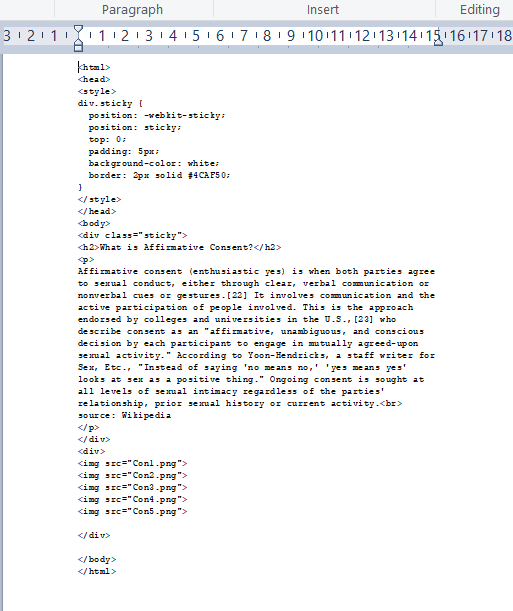
Position (sticky)

One of the position possibilities is colorfully called 'sticky'. What this means is
that the sticky element will remain in place as positioned as one scrolls.
Important to note: one needs to specify a background color (here white) or
else the text only will 'stick'. Below:


Thursday, February 8, 2018

Position absolute (CSS)

CSS is very powerful. Below, I have positioned the image
with the term absolute, with a -1 z value. The text will appear on top.

An image is normally an inline element, so that it can be positioned
with respect to text. As of html5, the command is vertical-align = "middle".


 http://photoblogstop.com/photoshop/adding-a-mirror-reflection-effect                    

Wednesday, February 7, 2018

Javascript (Let)

JavaScript is a sequential language. When reading a program, one needs
to be sensitive to variable scope. When designing a program, one looks to
flow structures...

From Microsoft:
 from Mozilla:

Tuesday, February 6, 2018

Linking JS Functions

It is always possible to find out what browsers asupport, since
they all run JavaScript. Below, how to link functions...


https://docs.microsoft.com/en-us/scripting/javascript/reference/return-statement-javascript#remarks

Javascript was developed as a scripting language for Web pages, and is not suited
for elaborate programs. It is possible to go on from one script to another, though. As
always, variable scope needs to be considered...


Svg vs canvas (basics)

Svg is the recommended W3C standard for graphics in a Web page.
Its use requires that we use the svg tag, and define a space for our element;
If the space is too small, the element will not show. In our example, we have
a center at (50,50) and a radius of 40 (pixels).The space is thus defined from
(0,0) at top left with positive increments going right and down. Svg deals in paths,
so that here the sides to a figure are referred to with 'stroke'. I have reduced the
width of the svg space from 100 to 50, and half our circle is gone!!


source: W3 Schools                                      

 *     *     *

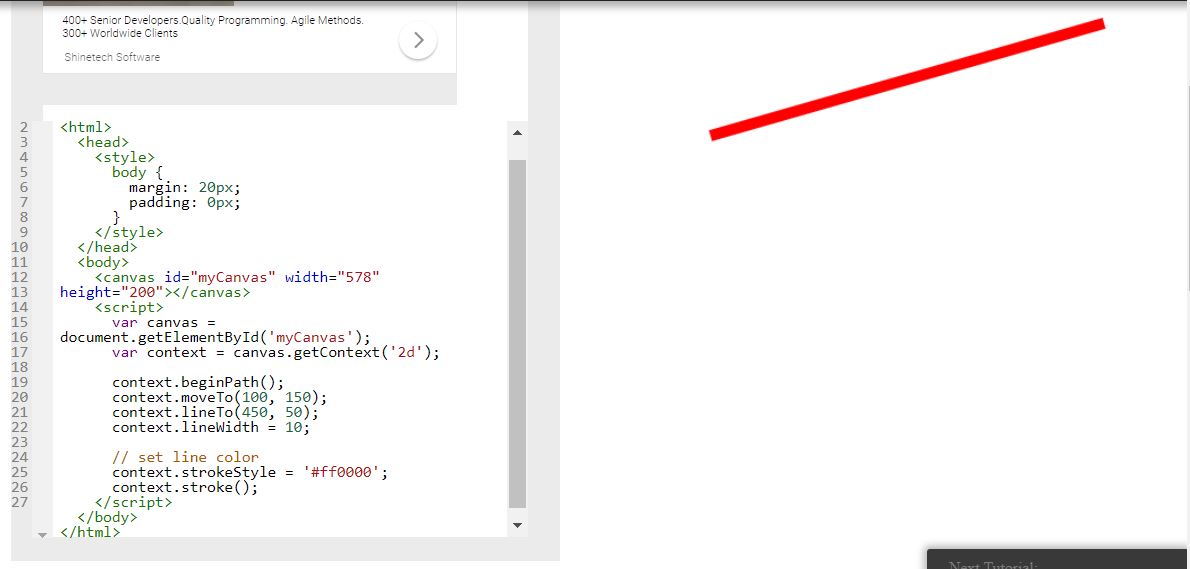
Working with canvas is different, in that one is using JavaScript
to tell the computer what to do. One positions the canvas with CSS,
and it becomes a space with (0,0) at the top left, but the styling terms are
strokeStyle for color, and lineWidth for pixels. And one needs to start
the ctx and - eventually - tell it to draw what we want with a command
of ctx.stroke().


 source: https://www.html5canvastutorials.com/tutorials/html5-canvas-line-width/                           

Monday, February 5, 2018

Svg vs Canvas

There are two ways to draw within Html, Svg (Scalable Vector Graphics) or using
the 'canvas' element. They are very different technologies, and come in handy under different
circumstances. Canvas was first developed by Apple (for games).

Microsoft describes the difference between the two with the notion that Svg images
are retained (in the DOM), whereas Canvas images are immediate (They do indeed need to be
redrawn at each turn of the clock). In practical terms, Svg images scale perfectly (they are vectors),
and canvas objects animate easily (with javascript). For the programmer, though, Svg needs
a new image at high magnification not to pixilate; and there are limited opportunities
on a canvas to know where the mouse is at any time.

With respect to rendering time, we get the following. On a large screen, Svg will render more
quickly. If there are a large number of objects, canvas is absolutely necessary. In short,
Svg tends to be used for professional applications, like engineering documents; canvas shows up
in learning and games. A map of a shopping mall would fall precisely in between: it is
up to the developer, his skills, and what he wants to do.


https://msdn.microsoft.com/en-us/library/gg193983(v=vs.85).aspx