Monday, January 29, 2018

Slice (Javascript) & Lesson 19 (head)

When getting user input with JavaScript, one needs to use
an entity designed to facilitate the job such as a prompt or a form.
Just lifting text can be tedious. Below, I want to get the name of
the person in the red dress for the photo: I have to create a variable
with a slice ie pick up the letters of the name...


photo source: MSN

                                     *     *     *

Below, the blog as seen on a mobile phone (iphone6/7), with Screenfly.
I set the screen to horizontal, and allowed scrolling.


                                         *     *     *
And just to see what the 'test your code' issues are, try Screenfly with the following:
http://quirktools.com/screenfly/
https://www.candywarehouse.com/dark-chocolate-kit-kat-candy-bars-24-piece-box/

                                      *    *     *

  Going to Mozilla Developer Network, one can find out a few useful things
about why the head section, and its meta tags,  are important:
- specifying that the character set is utf-8 means that foreign characters -such
as Japanese - will be rendered;
- adding a title to the document will give the site a name.This name will appear
on the browser tab, and will be the suggested name for an addition to
favorites;
- 'name' and 'content' can be used to store the name of the author;
- keywords are no longer used, but looking up Search Engine Optimization
will yield suggestion on information that might interest browsers;
- Google Webmaster Tools will provide Analytics;
- It is a good idea to specify the language in which the site is written.


Sunday, January 28, 2018

Lesson 18 (file paths)

We have a situation, here. Normally, I know
what to do to open an image file from an html
call.
<img src:"MyPictures/Bird.jpg" >

But what happens if the calling html is in the folder and the image
on the desktop ie the caller is one down from the image.
It turns out there is a certain way to do this.


VoilĂ : I have indicated that the bird image is one up with ../
(For recall, file systems do this by inverting the direction of the slash\).
I would use ../MyPictures/HappyB.jpg if the Bird ios in a MyPictures folder and
my html is in a MyCode Folder ...I still have to go up, then down.

The limiting case occurs when dealing with the root folder;
one just uses /Nameof. This would be the case for the 'index'
folder of a web site.

                               *     *     *


Saturday, January 27, 2018

La Seine in Paris

Drone film (police footage) showing the current level
of flooding in Paris. The peak - 6 meters, as opposed
to the normal low of 1,2meters - is to be reached Sunday night...


JavaScript (cont'd)

Some useful things to know about JavaScript:
The styling name conventions are not identical to those of CSS;
one needs to use camel case directives ie 'backgroundColor'
and not background-color!! Javascript predates CSS.

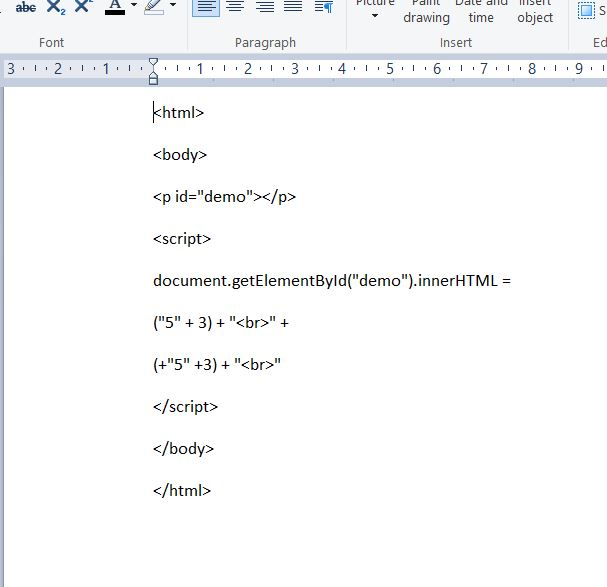
It is possible to change a string to a number. By default,
everything is a string, but if one adds the + operator, it
will behave as a number.( Other operations will happen
as expected).

One can parse input from the user, as with the BMI code
below.As always, the devil is in the details, and one needs to
worry about decimal places (enter numbers in metric).


Friday, January 26, 2018

Lesson 17 (JavaScript)

JavaScript is the programming language that allows one to
interact with the web page. The example below adds a button that
turns our phone on and off. It is also useful to the developer,
who can use it to check if certain events have happened, and
create a script that reacts. The second version of our phone sends a ring alert
once the page is loaded.

It is customary to have the actual script in the head section, although an
onload script might also find itself in the body of the code. Scripts are
functions, in the tradition of C languages. The function name is followed
by brackets with the input conditions (or none), and the action to be performed
is within curly braces.


source:Phone and Cat are from Google images.

                                                  *     *     *

source: Wikipedia
                                                *     *     *

http://eloquentjavascript.net/

Thursday, January 25, 2018

Lesson 16 (iframes)

It's -16°C this morning, and my spirit is broken: I want
cake for breakfast...
                                *     *     *
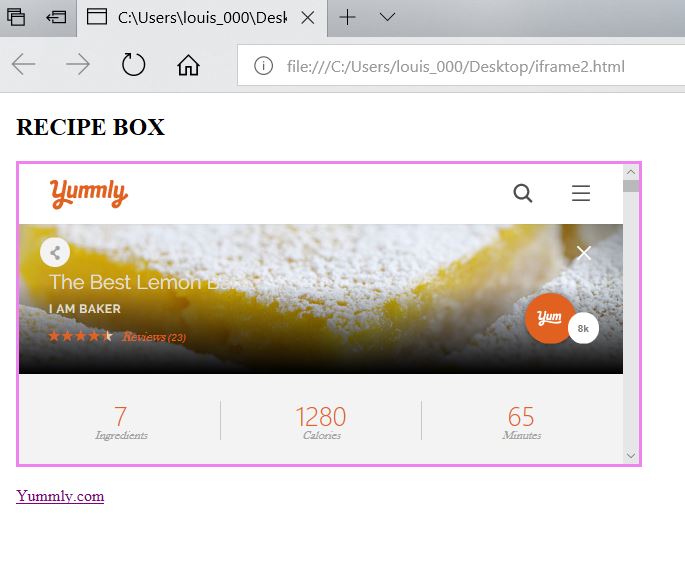
iframes are a powerful html feature: they allow one to show
a Web page within a Web page. This is perfect for my Recipe Box
food site; I want to be able to refer the user to a tasty recipe on
another site.

There are two versions of the code for this. The first simply opens
a site showing a page from another site within it. The second version
- more likely - forces the user to click on the site for it to appear.
It makes use of the targetproperty. (Specified within an anchor tag,
target:blank will open in a new window...)
source: W3 Schools


Wednesday, January 24, 2018

Lesson 15 (classes)

Html classes offer a handy way to style all similar referents
on a web page. If one wanted to show all headings in red on
a page, one could define a style for headings in the head section easily
enough; but if wanted to make appear all city names on a page about
Portugal, one could create .cities class and mark our cities with that idea.
And because one can specify with finer detail by using two classes at once,
one could show main cities as belonging to two classes, .cities and .main,
and therefore in bold and red. And in a complex web site,
divs might  belong to certain classes...etc

What the class does is defined in the head section, within the style brackets,
after a period and the class name. We are between two curly braces, and there is
no need for quotation marks. Attribution is done with a colon. (As is the
case for ID, meant to be used incidentally).
                                        *     *     *
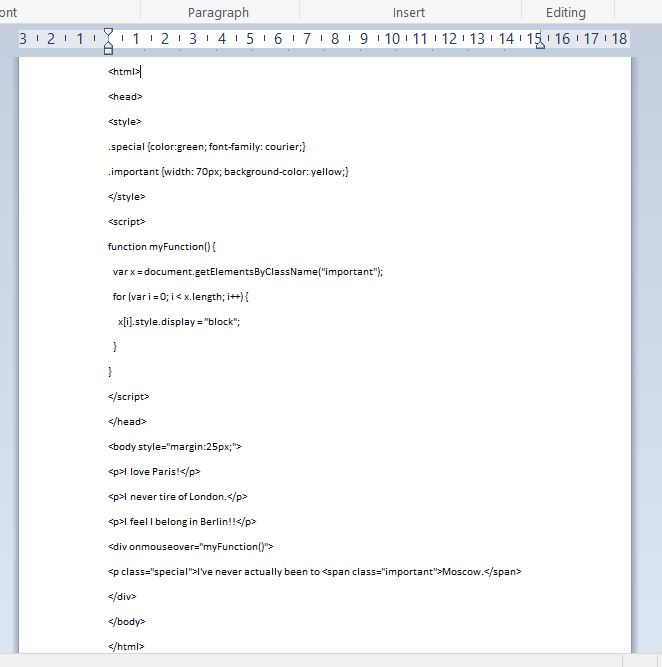
One can alter styling using classes and javascript. The example below
is interesting in that it uses the CSS Display property, which governs layout.
When I hover over Moscow with the mouse, it displays as a block element
and no longer inline with the text.